A Story of SSID Consolidation and Zone-Based Security
You know that moment when you’re explaining your home network to someone and you realize how ridiculous it sounds out loud? I had that moment when describing my SSID situation.
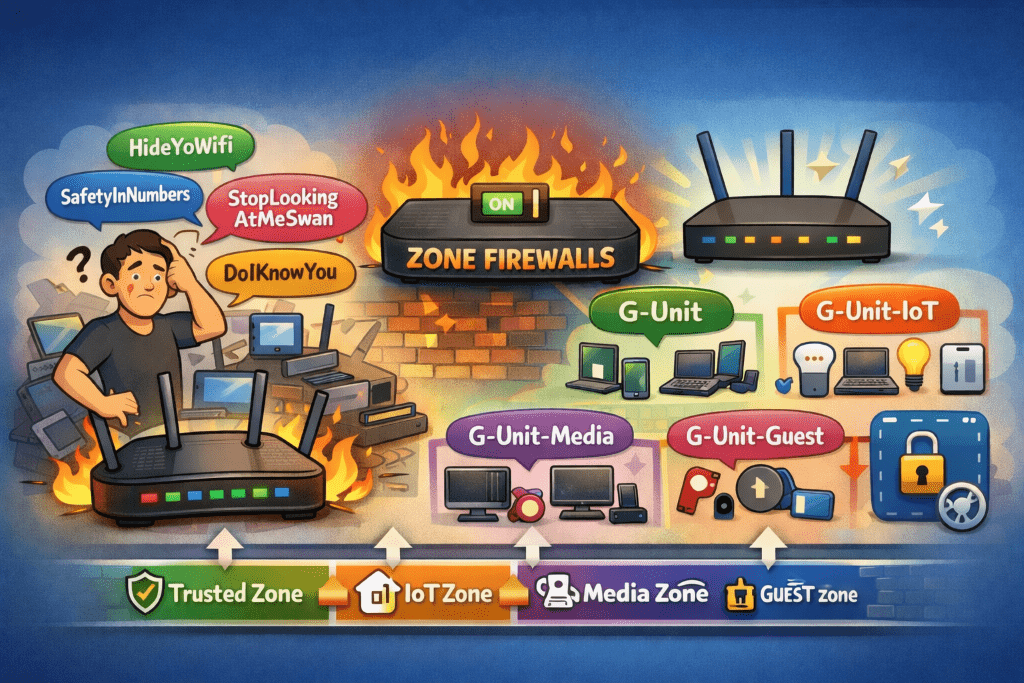
“So I have HideYoWifi, SafetyInNumbers, StopLookingAtMeSwan, and DoIKnowYou“
The look on their face said it all.
The SSID Situation
After cleaning up my device inventory (goodbye, 17 identical ubuntu-server instances), I turned my attention to the wireless side of things. I had four SSIDs, all serving the same flat VLAN 1 network. The only difference between them was… well, there wasn’t really a difference. They were functionally identical.
It was peak home network evolution: each SSID represented a moment in time when I thought “I’ll just create a new one for this use case” without ever deprecating the old ones.
The Upgrade That Changed Everything
My UCG Max supported zone-based firewalls, but I’d never enabled them. Why? Because zone-based firewalls are serious networking infrastructure, and I wasn’t sure I needed that level of complexity.
Then I looked at my flat network with its 77 devices and zero segmentation, and I realized: I absolutely needed that level of complexity.
On December 17th, I flipped the switch. The UCG Max upgraded to zone-based firewall mode, and suddenly I had the foundation for proper network segmentation. No more flat network. No more “everything can talk to everything” architecture. Just clean, policy-based isolation.
The SSID Consolidation
With zone-based firewalls enabled, having four identical SSIDs made even less sense. So I started the consolidation:
- StopLookingAtMeSwan → Disabled (it had one device: a Blink connection module)
- SafetyInNumbers → Merged into HideYoWifi (10 devices moved)
- DoIKnowYou → Kept as guest network (zero devices, but useful for visitors)
- HideYoWifi → Primary network (for now)
With my new VLAN architecture, I didn’t want a single “primary” network anymore. I wanted purpose-built SSIDs for different device classes. That meant new SSIDs with actual meaningful names.
Enter “G-Unit”
I needed a naming scheme. Something memorable, professional enough for guests, but with personality. I considered:
- “HomeNet-X” (too boring)
- “TheSkynet” (too obvious)
- “NetworkNotFound” (too clever by half)
For obvious reasons, my family’s group chat name is “G-Unit.” Why not continue with that name?
And you know what? It actually *worked* as a naming scheme.
The New SSID Structure:
- G-Unit → VLAN 10 (Trusted): Phones, laptops, work devices
- G-Unit-IoT → VLAN 20 (IoT): Smart home devices, sensors, automation
- G-Unit-Media → VLAN 40 (Media): Chromecasts, streaming devices, smart TVs
- G-Unit-Guest → VLAN 99 (Guest): Isolated network for visitors
Clean. Purposeful. Each SSID maps to a specific VLAN with specific firewall rules. No more “everything on VLAN 1” architecture.
The Migration
Between December 19th and 26th, I migrated 44 wireless devices across these new SSIDs. It was actually… smooth? Here’s why:
I kept the old SSIDs running during the migration. Devices could join the new SSIDs at their convenience. No forced cutover. No mass outage. Just gradual, steady progress.
The results:
- December 19th: 24 of 41 devices migrated (59%)
- December 19th evening: 36 of 41 devices migrated (88%)
- December 26th: 44 of 44 devices migrated (100%)
That last device? An iPhone that had been forgotten on the old SSID. Once it reconnected to G-Unit, I disabled HideYoWifi for good.
The Zone-Based Firewall Magic
With devices properly segmented, I could finally implement the security policies I’d been planning:
IoT Zone (VLAN 20):
- Can access Home Assistant (VLAN 60)
- Can access internet
- Cannot access file servers
- Cannot access Proxmox infrastructure
- Cannot access anything in Lab zone
Media Zone (VLAN 40):
- Can access NAS for media streaming (VLAN 60)
- Can access internet
- Cannot access IoT devices
- Cannot access infrastructure
Trusted Zone (VLAN 10):
- Admin access to all zones (with logging)
- Can manage infrastructure
- Can access all services
It’s beautiful. My Chromecast can stream from my NAS, but it can’t SSH into my Proxmox hosts. My smart plugs can talk to Home Assistant, but they can’t access my file server. Security through actual network isolation, not just hoping nothing bad happens.
The Aftermath
As of December 26th:
– 100% of wireless devices migrated to zone-based VLANs
– Zero devices on legacy SSIDs
– 204 firewall policies actively enforcing isolation
– Security score: 9.8/10 (up from 4/10 at the start)
The flat network is dead. Long live the segmented network.
What I Learned
- SSID consolidation is easier than you think. Keep old SSIDs running during migration. Let devices move at their own pace.
- Zone-based firewalls change everything. Once you have proper segmentation, you can actually enforce security policies instead of just hoping for the best.
- Naming matters. “G-Unit” is objectively ridiculous, but it’s memorable and tells a story. Sometimes that’s more important than being “professional.”
- Patience pays off. I could have forced a cutover in one evening. Instead, I spent a week doing gradual migration, and I had zero issues.
Next up: The infrastructure migration. Proxmox hosts, Kubernetes clusters, and the moment I discovered that bridge-vids doesn’t do what I thought it did.
Part 2 of the home network rebuild series. Read Part 1: The Accidental Network Archaeologist
Comments
One response to “From HideYoWifi to G-Unit”
[…] Part 3 of the home network rebuild series. Read Part 2: From “HideYoWifi” to “G-Unit” […]